


According to ESET, Türkiye Is Among the Countries Most Affected by Android Threats
Fake IPTV Update on Android Phones Targets Banking Passwords
A fake file disguised as an IPTV app update on Android phones steals PIN codes and mobile banking passwords by displaying fraudulent login screens over banking apps. Cybersecurity company ESET has highlighted that Türkiye is among the countries with the highest levels of Android threats, urging users to be cautious about the permissions requested by apps installed from outside official app stores. The RemControl Android Trojan, identified by Group-IB, is distributed through a fake APK disguised as an update for TVTap, an IPTV application.
An analysis of RemControl published by Group-IB on September 23 reveals how an app update installed from outside an official app store can turn into an attack targeting banking credentials. While users believe they are updating an application, the RemControl Android Trojan is installed on their phones. The malware abuses the Accessibility service to display fake login screens over banking apps, attempting to steal PIN codes, mobile banking passwords, and card expiration dates. Turkish banks are not currently included in RemControl’s target list; the campaign currently targets banks in Italy, France, Spain, Poland, Portugal, Canada, and the Gulf countries. However, because the target list and fake screens are delivered from the attackers’ server, adding a new country requires only a change to a server-side setting rather than installing new software on users’ phones.
Türkiye Stands Out in Android Threat Activity
According to the ESET Threat Report H1 2026, Türkiye ranked among the countries with the highest levels of Android threats, alongside Ukraine, between December 2025 and May 2026. During the same period, the most frequently detected Android threat was Android/TrojanDropper.Agent, accounting for 14.7% of detections. Following these types of droppers, which are used to install other malicious software on phones, the Android/Spy.Banker family—which steals banking information—ranked sixth, accounting for 4.3%.
IPTV APK files are attracting interest in Türkiye. According to Google Trends data, “iptv apk” has been a frequently searched term throughout the year. This trend highlights the importance of the risks associated with downloading apps from outside official app stores in Türkiye as well.
Fake Update Uses the Name of a TV Application
In the RemControl campaign, attackers do not compromise the genuine TVTap application. Instead, they create an APK that looks like an update for the app. The fact that users believe they are installing an update for an application they already know makes it easier for the malware to be installed on their phones.
The attackers create fake websites that imitate Google Play pages and drive traffic to them through Meta’s advertising infrastructure. Since TVTap is not available on Google Play, a Google Play-style page offering this application is itself a clear indication that the page is fake. During installation, Google Play Protect, the phone’s built-in security scanning feature, is disabled. The malware then requests permission to use the Accessibility service.
Accessibility Permission Overlays Banking Screens with Fake Pages
Android’s Accessibility service is designed to help users with visual or motor impairments operate their devices. An application granted this permission can read elements on the screen and tap on the user’s behalf.
After obtaining this permission, RemControl monitors which applications are open on the phone. When a banking app included in its target list is launched, the malware displays a fake login page over the bank’s genuine interface. Users are prompted to enter information such as their PIN, mobile banking password, and card expiration date. Once the information has been sent to the attacker, the fake screen closes, and the genuine banking application becomes visible again.
Can Erginkurban, ESET Türkiye Product and Marketing Manager, said:
“Whether an application is dangerous is determined less by where it is downloaded from than by what it asks for after installation. A legitimate streaming application has no need to read your screen or tap on your behalf. If a TV application requests Accessibility permission, stopping the installation at that point is the simplest way to protect the money in your bank account.”
The safest approach is to use official applications available through the official app stores of streaming services. Applications installed from outside official stores pose both security and legal risks.
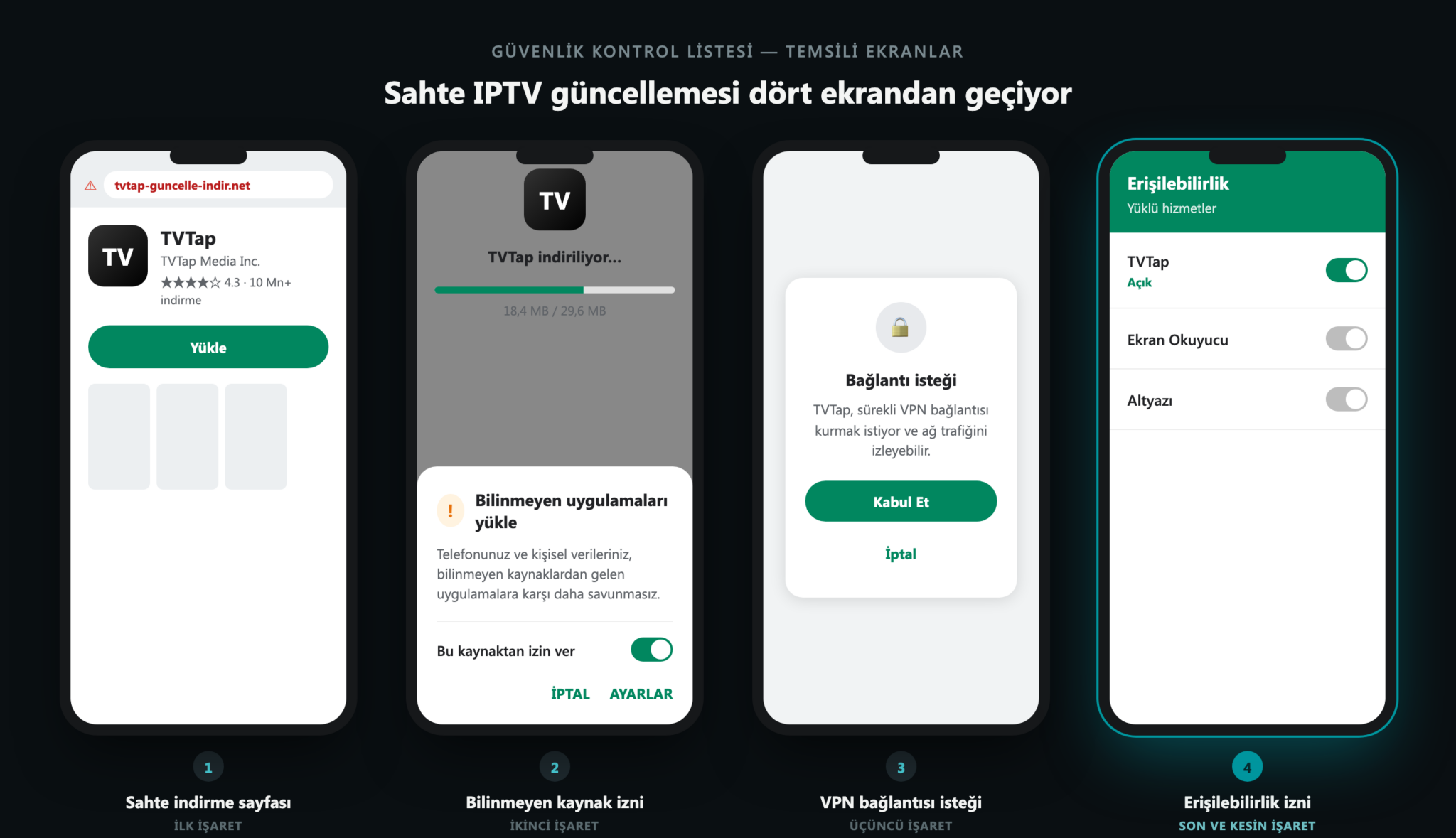
Four Things to Check When Downloading IPTV Apps or Updates from Outside Official Stores
Fake download pages: A website that looks like Google Play does not mean it is a genuine app store. A Google Play-style page offering an application such as TVTap, which is not available on Google Play, is itself a clear indication that the page is fake. Users should check the domain name in the address bar.
Installing apps from unknown sources: If an update for a TV application asks for permission to install another application, the process should be stopped.
VPN connection requests: An application used for streaming that wants to establish a VPN connection should raise suspicion.
Accessibility permission: A legitimate IPTV player has no reason to read the screen or tap on the user’s behalf. If this permission is requested, the installation should not be completed.
If permission has already been granted, the device should not be used for banking transactions, and the bank should be contacted from another phone. Because RemControl can block access to certain settings screens, the malicious application should be removed in Safe Mode.
In Safe Mode, only the applications that came with the phone are active, preventing the malware from interfering with the screen. To enter Safe Mode, turn the phone off and restart it. When the manufacturer’s logo appears, press and hold the volume-down button until “Safe Mode” appears in a corner of the screen. Then remove the unfamiliar application and restart the phone normally. If removal is not possible, performing a factory reset should be considered a last resort.
For more information:
https://antivirus.com.tr/iptv-apk-guvenli-mi-sahte-tv-uygulamasi-banka-sifresi/
Banner Inside Article - 728x90